INSIGHTS / CASE STUDY
Reconciling BAS to Xero: code calculates, AI explains
Every quarter, a small Australian practice checked each client's lodged BAS and IAS figures against Xero by hand. We built the tool that now does the checking. The AI in it is the smallest part, and it isn't allowed to do maths.

THE SHORT VERSION
- One Atosa export per client replaces a download per lodgement. Three Xero reports go in beside it. Nothing is re-keyed.
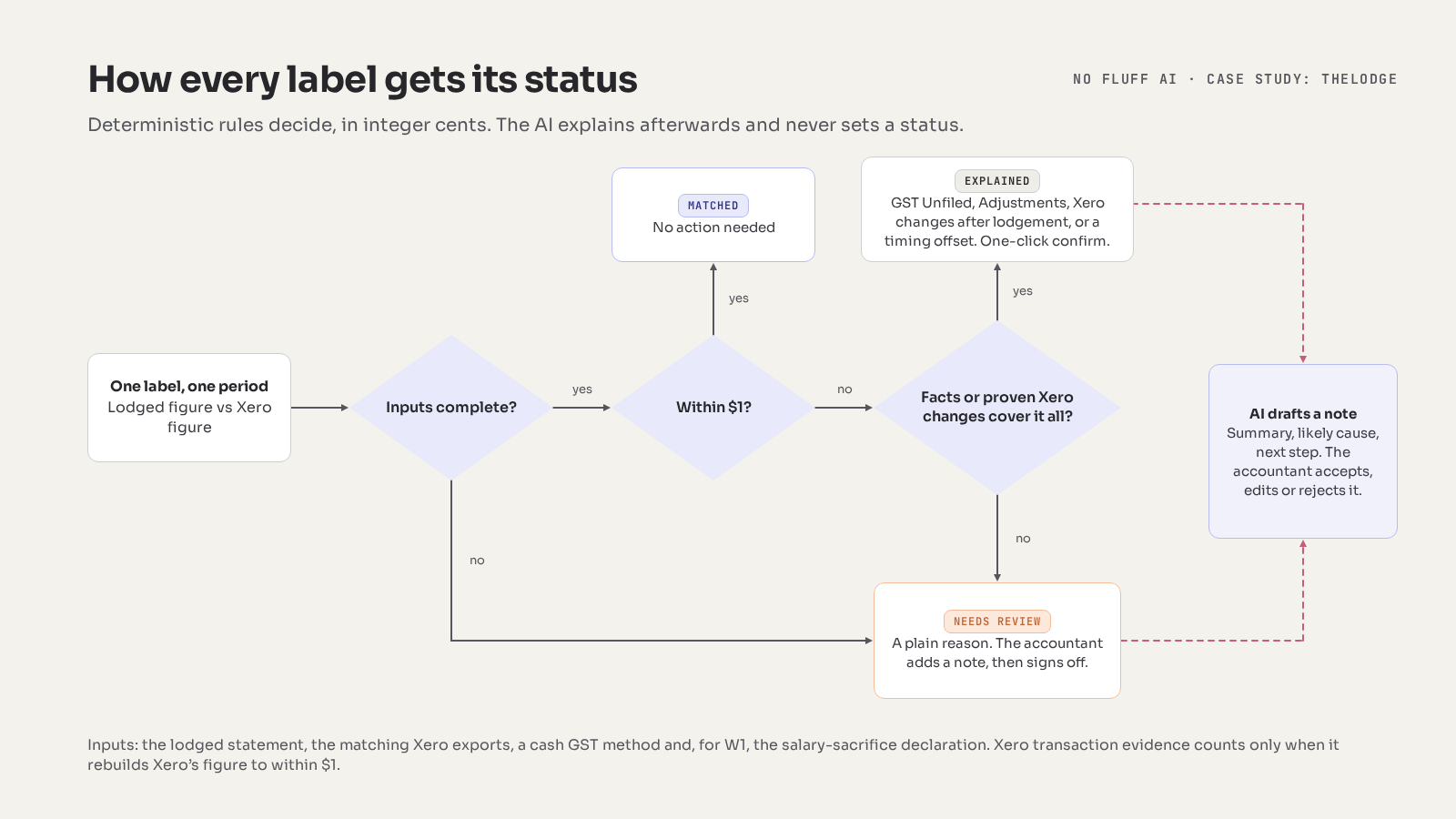
- Code compares G1, 1A, 1B, W1 and W2 in integer cents, for the period and the year to date, and gives each label one of three statuses: Matched, Explained or Needs review.
- New: when a GST label doesn't match, "Investigate in Xero" reads the quarter's transactions, read-only, and finds what changed after the BAS was lodged. It explains a difference only when the transactions add back up to Xero's own figure. Otherwise it says the evidence is incomplete.
- A model running on the accountant's laptop drafts a short note for every label that isn't Matched. A note that quotes a number not in its facts is rejected.
- The accountant accepts, edits or rejects each note and signs off. An Excel workpaper comes out. Nothing is lodged.
- The first real client-quarter ran end to end on 11 October 2026. The Xero investigator is built and tested on invented data; live checks come next.
The practice and the problem
TheLodge is a small Australian accounting practice, and the pilot covers its five Xero clients. GST is lodged quarterly on the BAS; PAYG withholding monthly on the IAS, with the quarter's BAS carrying the third month's W1 and W2.
Before each sign-off, the practice reconciles what was lodged against what Xero now says. For every client and period that meant opening each lodged statement in the ATO portal, copying the labels into an Excel workpaper, exporting the GST Reconciliation, Profit and Loss and payroll reports from Xero, comparing them with formulas, chasing every difference and writing the conclusion. The Excel file, the notes and a few screenshots were the review record.
None of that is difficult. It is repetitive, and it competes for the same hours as the client work the practice is actually paid for.
What the audit found
We start every engagement the same way: with the real workpaper and the way the work is actually done, before we recommend anything. Four findings shaped the build.
- The bottleneck wasn't the note. Writing "the difference is GST entered after lodgement" takes a minute. Getting to the point where you know that takes the rest: collecting, comparing and narrowing.
- Investigation is report-first. The accountant reasons from report-level facts, such as GST Unfiled, Adjustments and the year-to-date position, before opening any transactions. When those facts don't account for a difference, the next question is always the same: what changed in Xero after the BAS was lodged?
- The lodged figures already sit in one place. Atosa holds the practice's lodged activity statements, and one Excel export per client covers every period. The per-lodgement portal downloads could go.
- The inputs are consistent. The same four reports and the same five labels, every period. That makes this a rules problem, not a model problem.
Our verdicts
Every idea gets a written verdict. Here are the six that mattered, including the ones we said no to, and the one we have since changed.
| Verdict | Idea | Why |
|---|---|---|
| GO | Reconcile the five labels with deterministic rules | Exact, repeatable and explainable to the cent. A model would add risk and nothing else. |
| GO | Draft a review note for each exception | Writing is what language models do well, when they only see verified facts and are checked afterwards. |
| GO was NOT YET | Trace a GST difference to the Xero transactions behind it | We first said not yet to AI doing this, and we still would. The accountant did want the answer, so we built it as read-only code that only explains a difference when the transactions add up to Xero's own figure. Changed 15 Oct 2026. |
| NOT YET | Take the report figures from Xero's API | The API doesn't return these reports the way the accountant exports and trusts them, so each would need rebuilding and proving. The exports stay the figures; the read-only connection is used only as evidence. |
| NO-GO | AI doing sums or setting a status | Every figure and every status comes from code, including the Xero investigation. |
| NO-GO | Lodging, amending, paying or writing to Xero | The tool holds no ATO or Atosa credentials and has no write access to Xero. The accountant lodges. |
One more decision belongs to the practice, not to us: client facts don't go to a cloud model. Inference runs on the accountant's own laptop.
How it works
Five steps, and one decision-maker.
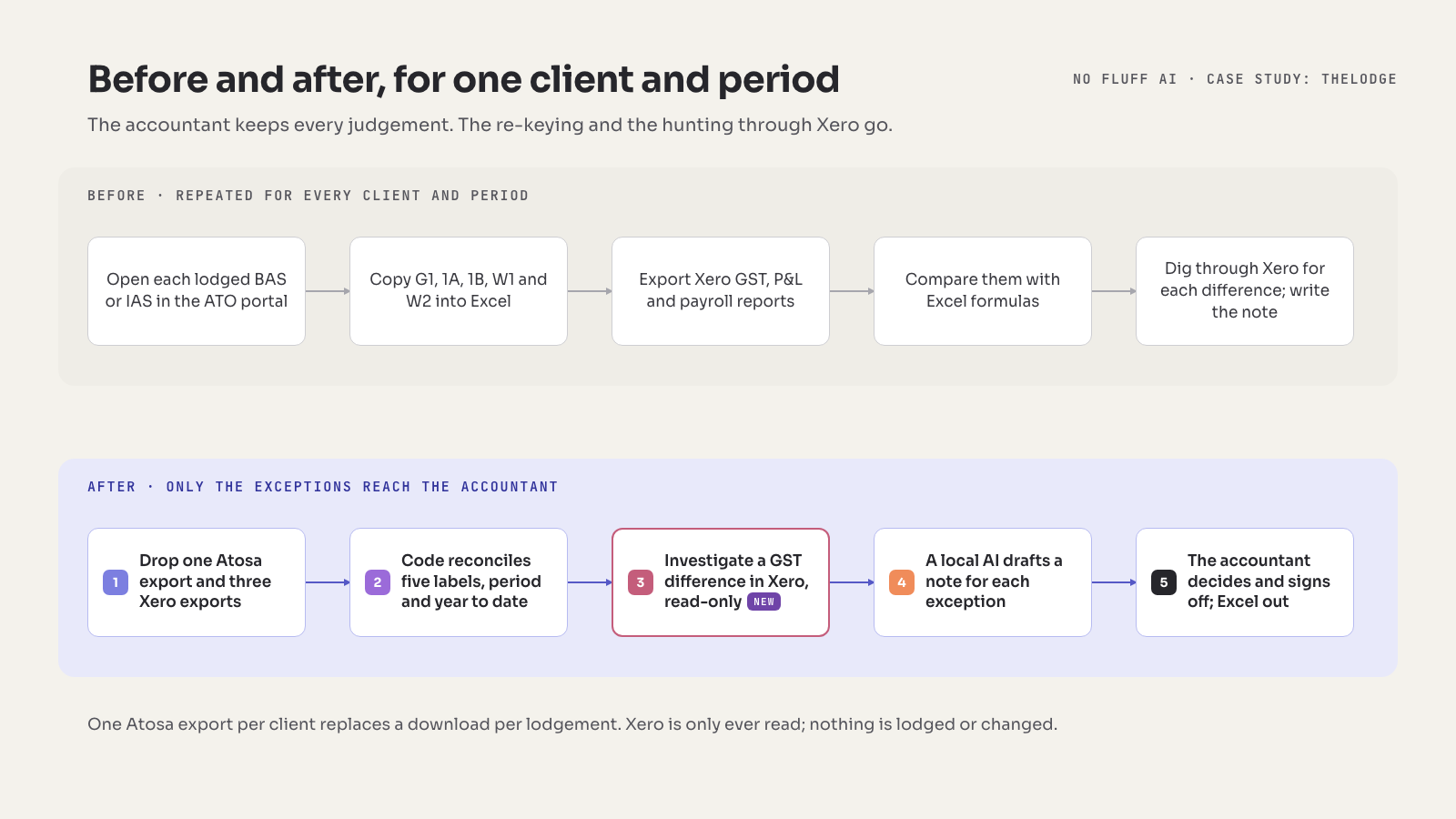
1. Drop the exports
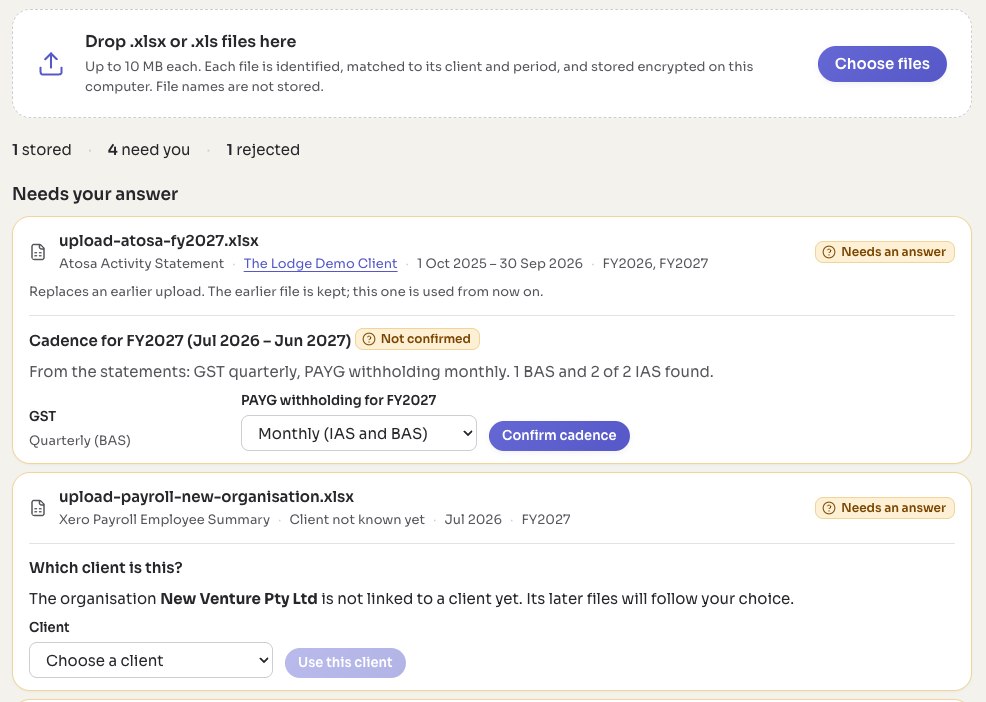
The accountant downloads four kinds of file and drops them on one screen, all at once.
| File | Source | How often |
|---|---|---|
| Activity Statement workbook, all periods | Atosa | Each upload |
| GST Reconciliation, financial year to date, cash basis | Xero | Each quarter |
| Profit and Loss, cash basis, the quarter | Xero | Each quarter |
| Payroll Employee Summary, the month | Xero | Each month |
The app works out what each file is, which organisation and which period it covers, and matches it to a client. It asks only about genuine ambiguity: a Profit and Loss that doesn't state its basis, an organisation it hasn't seen, or a workbook with two statements for the same period, which usually means an amendment. Xero's GST Reconciliation only exports to Excel as an older .xls file, so the app reads that format as well as .xlsx, without running any formulas or macros.
Uploads are versioned. An amended statement replaces the original for new runs, the accountant can see that it did, and earlier runs stay exactly as they were.
2. Code reconciles
Five rules, one per label. All amounts are integer cents, and the difference is always lodged minus Xero.
| Label | Lodged | Compared with, in Xero |
|---|---|---|
| G1 Total sales | BAS G1 | Cash Profit and Loss total income, plus GST Collected when the BAS says G1 includes GST |
| 1A GST on sales | BAS 1A | GST Reconciliation: GST Collected, that quarter's row |
| 1B GST on purchases | BAS 1B | GST Reconciliation: GST Paid plus GST on imports, that quarter's row |
| W1 Salary and wages | IAS or BAS W1, the month | Payroll Employee Summary earnings, less the declared salary sacrifice |
| W2 Amount withheld | IAS or BAS W2, the month | Payroll Employee Summary tax |
Two details matter to anyone who has done this by hand. GST labels are compared only when the lodged BAS states the cash method; anything else, or a method that can't be read, is Needs review. And W1 isn't computed until the accountant has declared that month's salary sacrifice, either "none" or an amount. The declaration appears in the workpaper as the accountant's own assertion.
Each label in each period then gets its difference, its year-to-date difference and one status:
- Matched. Within $1. No action needed.
- Explained. Over $1, but report-level facts account for all of it: GST Unfiled for that quarter equals the difference, because something changed in Xero after lodgement; GST Adjustments equal the difference; for G1, 1A or 1B, Xero transactions changed after lodgement account for it, proven complete (step 3); or a later period reverses it and brings the year to date back within $1. That last one is a timing offset, linked to the later period, and the earlier record is never rewritten. The accountant confirms each Explained label with one click.
- Needs review. Everything else, with a plain reason: a missing, duplicate or amended statement, a missing export, a non-cash GST method or an undeclared salary sacrifice.
Unknown is a valid outcome. We would rather show Needs review with a reason than a confident guess.
The G1 formula, GST on imports in 1B and the $1 tolerance are pilot rules. The accountant still has to confirm each one.
3. Investigate in Xero, when a GST figure has moved
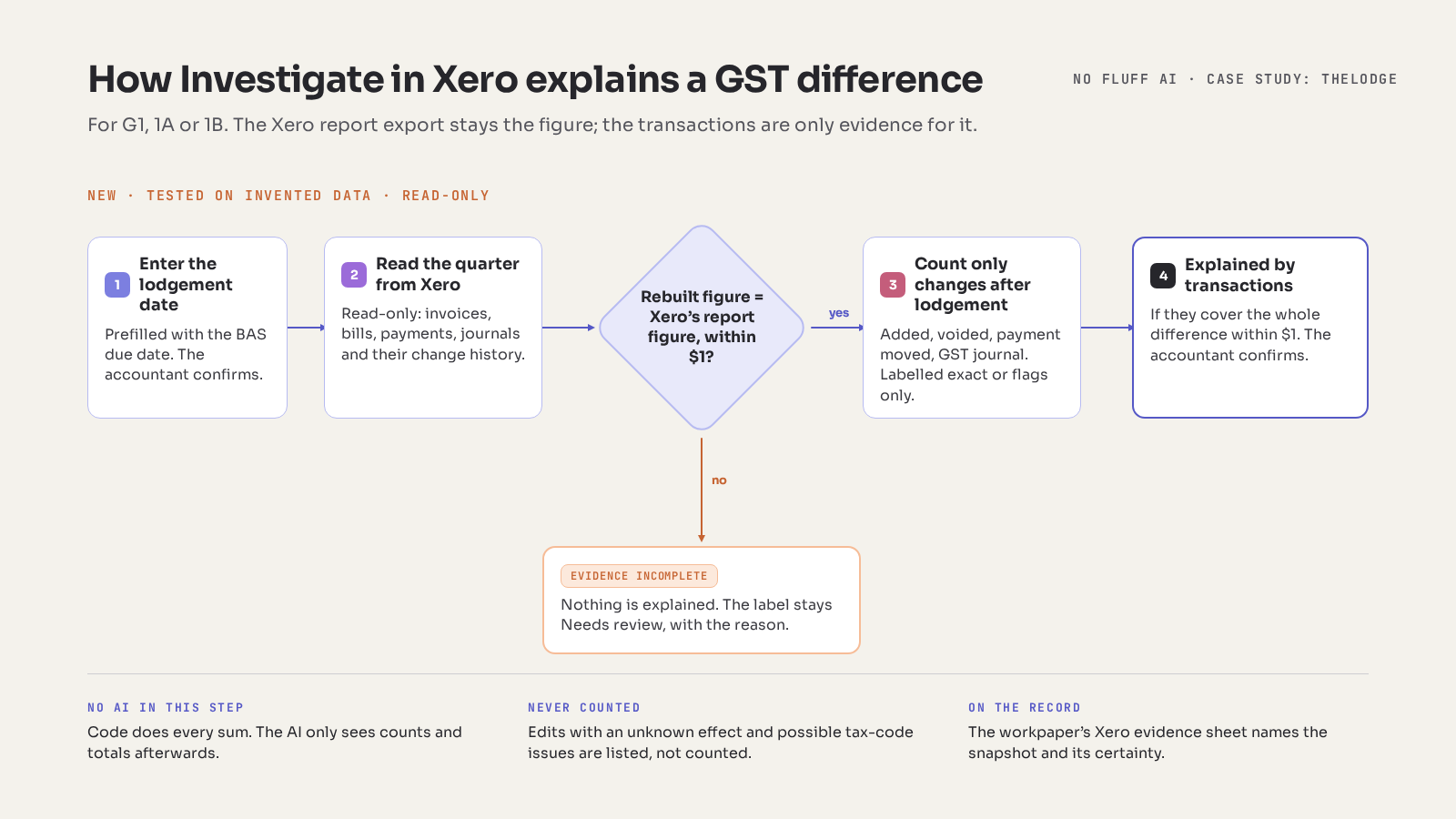
Report-level facts say that Xero changed after lodgement, not what changed. For a G1, 1A or 1B difference they don't cover, the accountant can press "Investigate in Xero". It's new, built after the first version of this case study, and it is code, not AI.
- The accountant enters the lodgement date. Atosa doesn't record it, so the app pre-fills the BAS due date and asks. Changes in Xero from that day on count as after lodgement.
- The app reads the quarter from Xero, read-only. Invoices, bills, credit notes, payments, bank transactions, manual journals and their change history. Each client has its own optional connection, checked against the client's ABN. It has no write access.
- It proves the pull is complete. It rebuilds the label from the transactions on a cash basis and checks the result against Xero's own report figure. If the two differ by more than $1, the evidence is incomplete and explains nothing. The label stays Needs review, with the reason.
- It counts only changes it can be sure of. A transaction added, voided or deleted, a payment moved into or out of the quarter, a GST journal entered after lodgement. Edits whose effect it can't determine, and possible tax-code problems, are listed for the accountant but never counted.
- It says how sure it is. "Exact" only when a Xero snapshot from within seven days of lodgement exists to compare against; otherwise "flags only", with the reason. The workpaper's Xero evidence sheet records which.
If the counted changes account for the whole difference, within $1, the label becomes "Explained by transactions", and the accountant still confirms it. The Xero report export stays the authoritative figure; the transactions are only evidence for it.
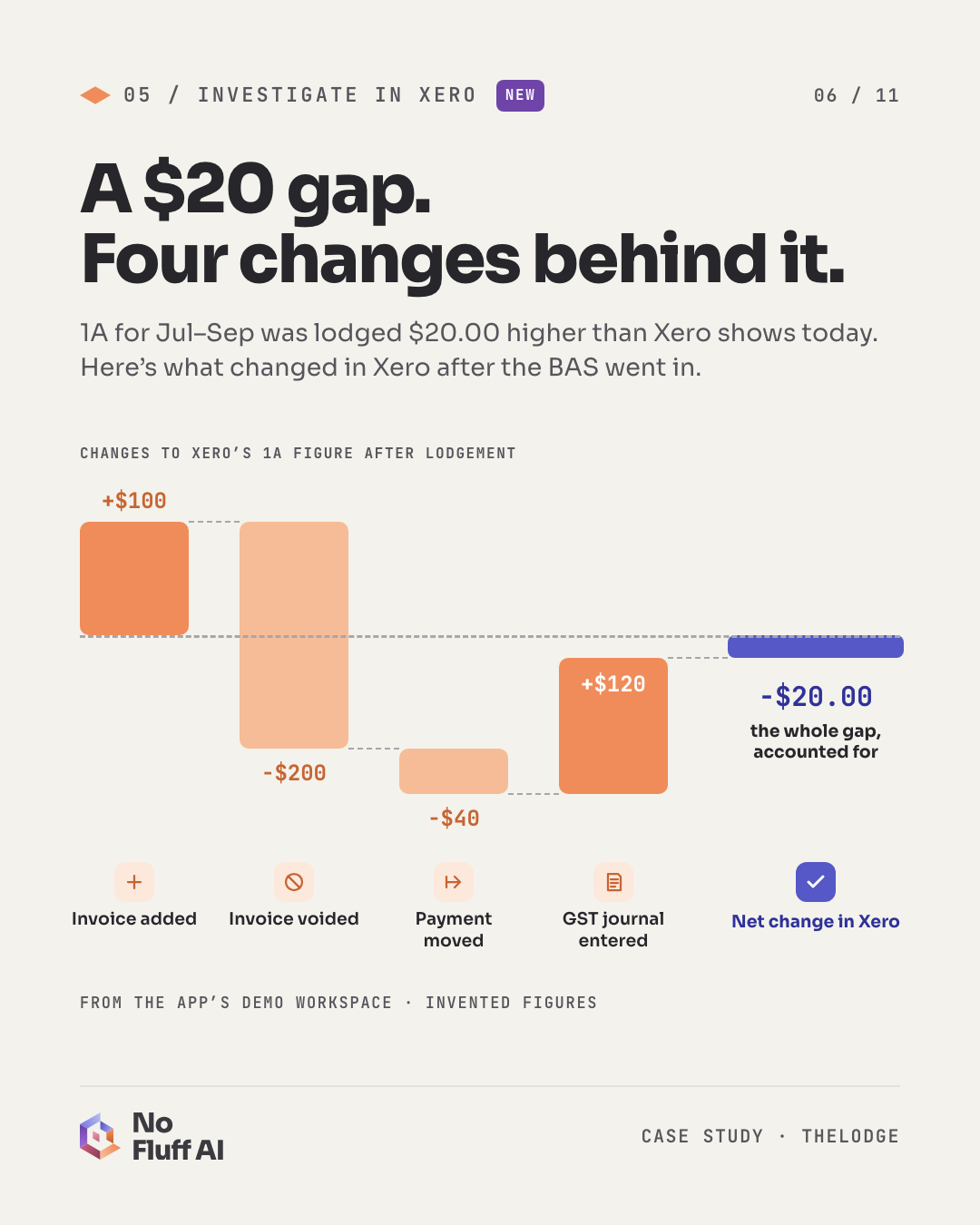
A $20 difference is easy to wave through. In this demo, $460 of changes sit behind it. That is what the accountant is signing over. It's built and has passed independent reviews against invented Xero data. The checks against Xero's demo company and a real client file come next.
4. The AI drafts a note, and gets checked
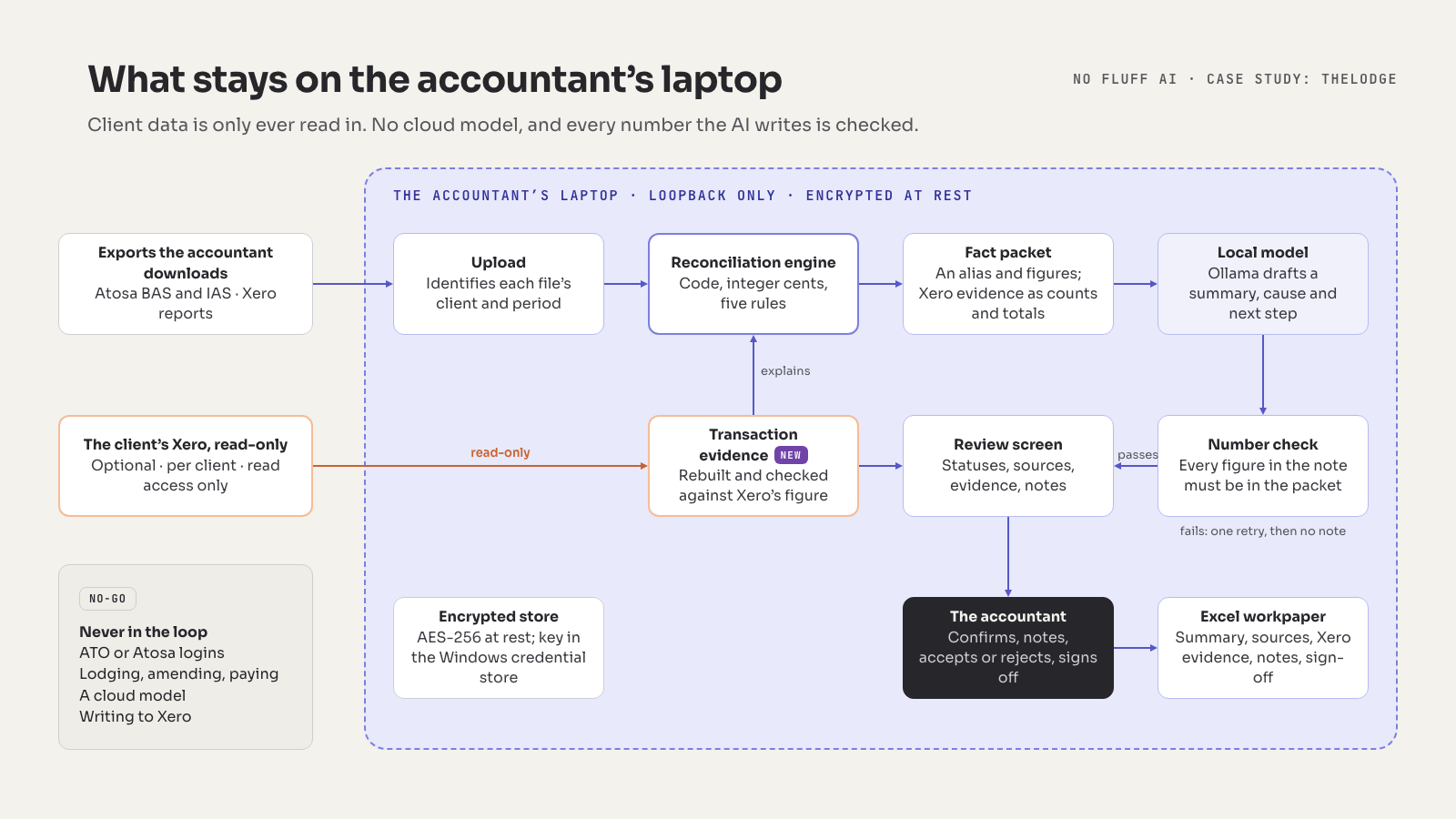
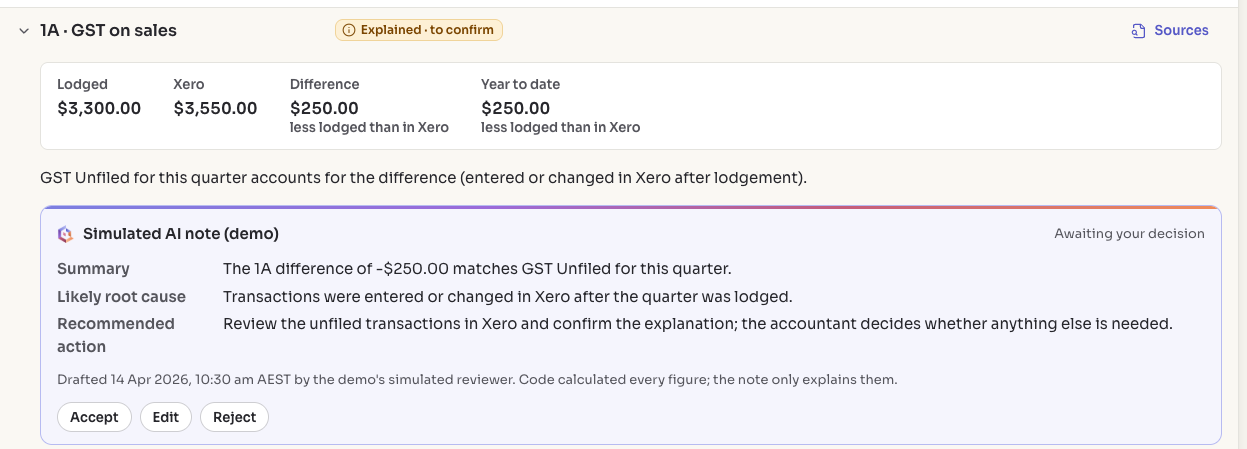
For every label that isn't Matched, a language model drafts a short review note. This is the only place AI appears, and it is fenced in on every side.
- Local. The model runs through Ollama on the accountant's own laptop. No client fact leaves the machine.
- De-identified. It reads a fact packet built field by field: a client alias such as "Client A", the label and its rule, the lodged and Xero figures and their components, the differences, statuses and reasons. For an investigated GST label it adds counts and totals from the Xero evidence. Organisation names, ABNs, file names, employee data and transaction contacts, references or descriptions never enter it.
- Constrained. Its reply must fit a fixed schema: a summary, a likely root cause and a recommended action, each a sentence or two.
- Number-checked. Every number in the note must appear in the packet, compared in cents. Percentages and number words fail. A failing note gets one retry; after that, the label simply has no note.
- Bounded. The model never calculates and never sets a status. The accountant accepts, edits or rejects every note, and both versions are kept.
Which model? That's decided on the accountant's own laptop, an ordinary office machine without a dedicated graphics card, by scoring a shortlist of small open models against 50 invented fact packets. Each is measured on whether its replies fit the schema, pass the number check and arrive in reasonable time, and on whether the accountant finds the notes useful.
5. The accountant decides
A practice dashboard shows every client for the period, with status counts and a review queue. Each client-period opens to its labels, the AI note, the accountant's own note and a sign-off. Any figure can be traced to the report, row and cell it came from.
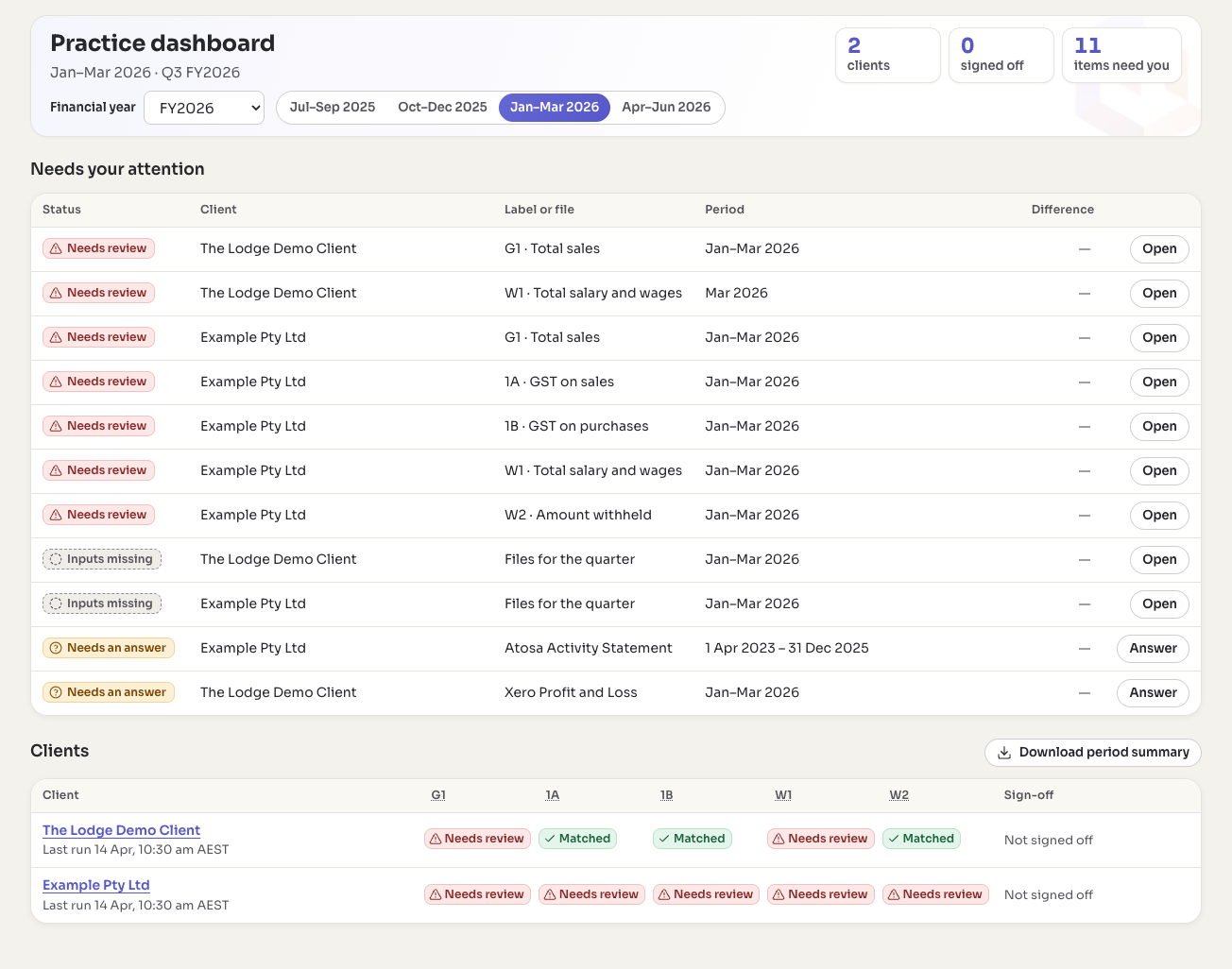
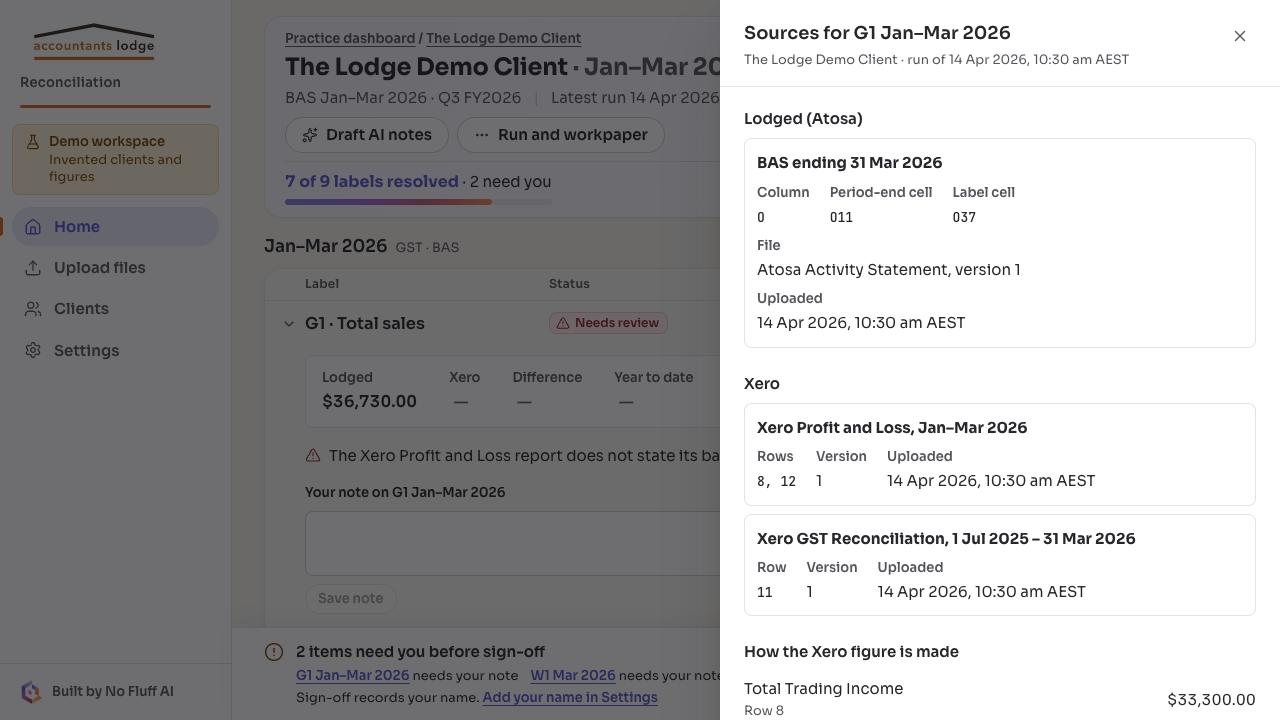
Sign-off produces an Excel workpaper for the client-period, with Summary, Sources, Xero evidence, Review notes and Sign-off sheets, plus a period summary across all clients. Sign-off needs a note on every Needs-review label and a confirmation on every Explained one. Completed runs are immutable; a new upload or an amendment creates a new version.
Confidentiality, by design
- The app runs only on the accountant's laptop and listens only to that machine.
- Client data is encrypted at rest, with the key held in Windows Credential Manager.
- Xero is read-only. The optional connection is per client, has no write access, and what it reads is encrypted on the laptop. There are no ATO or Atosa credentials anywhere in the tool.
- No client data goes into web addresses, logs or browser storage.
- Every test runs on invented clients and figures. Checks against real files print structure only: report types and labels, never amounts or names.
Where it stands
On 11 October 2026 the first real client-quarter ran end to end: one client's BAS and its three months of payroll. 1A, W2 and two of the three months' W1 matched. G1, 1B and one month's W1 came up as differences for the accountant to judge. That's the tool doing its job: surfacing the differences, not resolving them.
The next steps happen on the accountant's own laptop: the install, the model evaluation, confirming the G1 formula, GST on imports and the $1 tolerance, and a recorded go or no-go. Once those are done we'll publish the measured result, hours per quarter before and after, including if the number disappoints.
Investigate in Xero was built on 14 and 15 October 2026 and tested on invented Xero data. Before it reaches the practice it has to pass a check against Xero's demo company and a check on a real client's file. We expect some G1 evidence to come back incomplete at first: G1 is compared against Profit and Loss income, which the transactions don't map to one-for-one yet. It will say so rather than guess, and we'll report what the real files show.
What we'd do differently
We nearly made the mistake we warn clients about. Early on, we spent weeks hardening hand-built file readers against edge cases in Xero exports, before a single real file had run end to end. The reconciliation is generic and the inputs are consistent; a well-maintained spreadsheet library reads them fine. A structured scope review cut the build to five rules and four exports, and the first real quarter ran three days later.
If you're scoping something similar:
- Run one real file end to end in the first week.
- Prefer a maintained library to a clever parser.
- Decide what the AI isn't allowed to do before deciding what it does.
The bottleneck wasn't writing the note. It was everything before it.
Five questions before you buy AI for reconciliation
- Which figures does the tool calculate, and can you trace each one to a cell in a source report?
- Where does client data go, and where does the model run?
- What happens when the tool doesn't know? A reason beats a confident guess. And when it explains a difference, can it prove the explanation is complete?
- Can the AI change a number or a status? It shouldn't be able to.
- Who signs off, and what's in the workpaper when they do?
NEXT STEP
Start with clear rules for the AI your team already uses
That's the AI Safe-Use Setup: an inventory of the AI tools your team uses, a one-page policy written to the TPB's AI guidance, and a 3-hour hands-on session for your team. When one workflow looks worth testing, Reality Check Lite gives every step a verdict.
- From A$4,950 + GST, about 4–6 weeks
- We look at the tools, never at client files